
The AI response is slow to appear
Learn how to stop a response from being generated and restart your request if the AI keeps running indefinitely.
Updated on 2026-02-13
Step 1: Confirm that the AI is generating a response
When the AI is processing your request, a stop button appears at the bottom right of the screen. As long as this button is visible, it means the AI is generating its response.

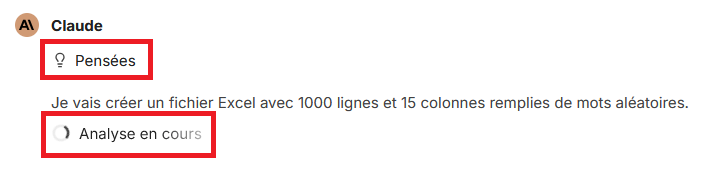
You can also tell whether the AI is currently processing your prompt by checking the reasoning and the status of the analysis:
Step 2: Stop the generation
If the response keeps generating indefinitely or appears to be stuck, click the stop button. This immediately interrupts the generation process.
Step 3: Regenerate the AI response
Once the generation has been stopped, place your cursor over the AI response. A set of icons should then appear. Click the  icon to restart the generation of the response.

Practical tips
- If the problem persists after several attempts, try a different AI model.
- Make sure your request is not too complex or too long, for example if you are generating a large file.
- If you run into this problem regularly, contact Munia technical support to report the situation.